What Does IPTV Mean? — The Definition
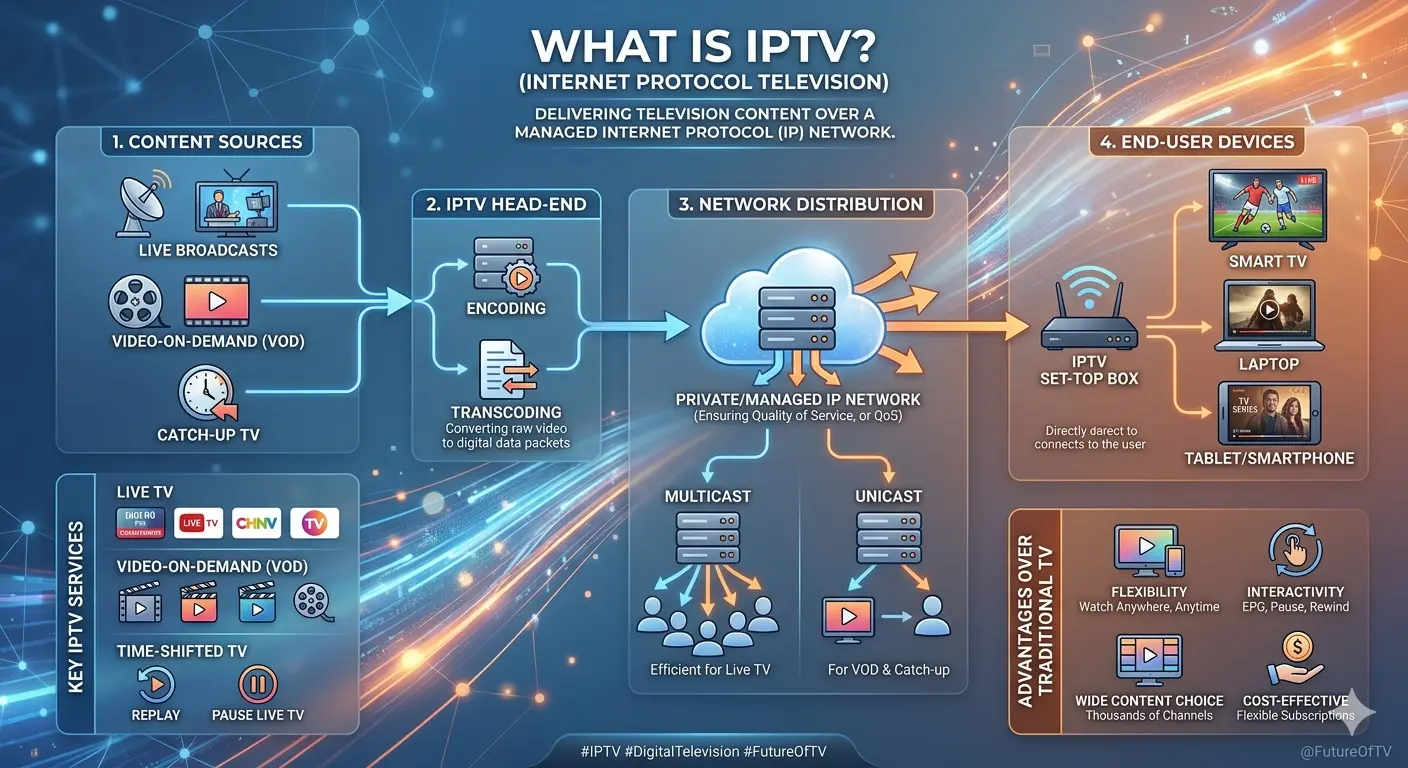
IPTV stands for Internet Protocol Television. It is a digital television broadcasting method that uses internet protocols (IP) to transmit TV channels, movies, series, and other video content directly to your screen — via your broadband or fiber internet connection.
Unlike traditional television delivery systems — terrestrial (antenna), cable, or satellite — which transmit content via radio waves or physical cables using proprietary broadcast signals, IPTV delivers video content encoded as digital data packets that travel over the same networks used to send emails, load websites, and stream music. This is essentially the same underlying mechanism as services like Netflix or YouTube, but applied to the full spectrum of live TV broadcasting, video on demand (VOD), and time-shifted television.
The term "Internet Protocol" refers to the foundational technology rules that govern how data is transmitted across interconnected computer networks. When we say IPTV uses IP, we mean it leverages this universal internet infrastructure — meaning any device capable of connecting to the internet can theoretically receive IPTV signals, from your smartphone and tablet to your Smart TV, desktop computer, and dedicated IPTV set-top boxes.
IPTV is not a single product or service — it is a technology category. A wide ecosystem of providers, platforms, apps, and hardware has grown around it. Some IPTV services are operated by your home internet service provider (ISP), such as Bell Fibe TV or TELUS Optik TV in Canada. Others are third-party IPTV subscription services that offer massive channel packages, often including international content from dozens of countries, at a fraction of the cost of a traditional cable package.
A Brief History of IPTV
The concept of delivering video over IP networks was first explored in the 1990s. The term "IPTV" itself was formally coined around 1994, and the first commercial IPTV services began to appear in the early 2000s. Telecom giants like BT (UK), AT&T (USA), and Bell (Canada) were among the early adopters, launching managed IPTV services bundled with their broadband packages.
The explosive growth of consumer broadband bandwidth in the 2010s — particularly the rollout of fiber-optic internet — made IPTV viable at scale. As download speeds and network reliability improved dramatically, IPTV quality rose to match and eventually surpass cable and satellite. Today, 4K Ultra HD IPTV streams are commonplace, something cable television has largely failed to deliver at scale.
The rise of smartphones and smart TVs in the 2010s further accelerated IPTV adoption. Apps like IPTV Smarters Pro made it effortless to access IPTV subscriptions on any device, while the proliferation of low-cost Android TV boxes opened IPTV up to non-technical users. By the mid-2020s, IPTV had become the dominant way millions of households worldwide consumed television content.
How Does IPTV Work? — A Technical Explanation
Understanding how IPTV works requires a brief look at how traditional television compares and then how IPTV improves upon it. In traditional broadcast television, a central transmitter sends a continuous radio signal — whether over the air, through a cable, or via satellite — to every receiver simultaneously, regardless of whether anyone is watching. This is an inherently wasteful one-way, always-on broadcast.
IPTV fundamentally differs. It works on a request-and-deliver model (often called unicast for on-demand and multicast for live TV), where the content is only sent when a user requests it. Here's how the process works step by step:
- Content Acquisition: The IPTV provider acquires television content — live TV feeds, movies, series, sports — from broadcasters, studios, and distributors through licensing agreements. This content is received at the provider's headend (central server infrastructure).
- Encoding and Compression: The raw video signal is encoded into a digital format using codecs such as H.264 (AVC), H.265 (HEVC), or AV1. This dramatically compresses the file size while maintaining picture quality. A 4K stream at 60fps might be compressed from hundreds of Mbps of raw data down to 15–25 Mbps for delivery.
- Packaging and Distribution: The encoded streams are packaged (often using protocols like HLS — HTTP Live Streaming, MPEG-DASH, or RTSP/RTP) and distributed via a Content Delivery Network (CDN). CDNs place servers geographically close to end users to minimize latency and buffering.
- Transmission Over IP: The packaged stream is transmitted over the public internet (or a private managed network) as a series of data packets. These packets travel through your ISP's network, into your home router, and to your device.
- Decoding and Playback: Your IPTV player app (such as IPTV Smarters Pro, TiviMate, GSE Player, or a built-in Smart TV app) or your IPTV set-top box decodes the incoming data packets in real time and renders the video and audio on your screen.
Key IPTV Protocols and Technologies
Several protocols and standards underpin IPTV delivery. Understanding them helps when troubleshooting or choosing equipment:
M3U / M3U8 Playlists
The most widely used IPTV format. A text file listing stream URLs for all channels. Used by virtually every IPTV player app including Smarters Pro and TiviMate.
Xtream Codes API
A popular backend API standard for IPTV panels. Allows apps to log in with a username/password and server URL instead of managing M3U files manually.
HLS (HTTP Live Streaming)
Apple's adaptive streaming protocol. Splits streams into small segments and adjusts quality based on your bandwidth — ideal for stable, high-quality IPTV.
RTSP / RTMP
Real-Time Streaming Protocols. Older but still used for ultra-low latency IPTV delivery, particularly for live sports where real-time performance is critical.
EPG (Electronic Programme Guide)
XML-based TV guide data that shows what's currently on and what's coming up. Compatible IPTV apps display this as a visual TV guide overlay.
H.265 / HEVC Codec
Next-gen video compression used for 4K IPTV streams. Delivers 4K quality at roughly half the bandwidth of H.264 — essential for smooth 4K IPTV in Canada.
Types of IPTV Services — A Full Breakdown
Not all IPTV is the same. There are several distinct categories of IPTV services, each with different characteristics, pricing models, and use cases. Understanding the types will help you choose the right IPTV service for your needs in Canada.
1. Live IPTV (Linear Television)
Live IPTV replicates the traditional broadcast TV experience — you watch channels in real time as they air. This includes news channels, sports networks, local Canadian channels, international channels, and specialty channels. A quality IPTV subscription from Canada can include tens of thousands of live channels from around the world, including Canadian, American, French, Spanish, Arabic, South Asian, and more.
2. Video on Demand (VOD)
VOD is a library of movies, TV series, and documentaries that you can watch at any time, in any order, and with pause/rewind/fast-forward control — essentially Netflix-style viewing. A good IPTV service from Canada will typically include a large VOD library alongside live channels, often with recent theatrical releases and full TV series catalogues.
3. Time-Shifted IPTV (Catch-Up TV)
Time-shifted IPTV allows you to watch content that already aired — hours or even days ago — without needing to have recorded it. Also called catch-up TV or start-over TV, this feature is increasingly standard in premium IPTV subscriptions and is particularly useful for sports, news, and primetime shows.
4. Near Video on Demand (nVOD)
A less common but useful feature, nVOD schedules the same content to start at staggered intervals — every 15 or 30 minutes — so you never have to wait long to start watching a specific movie. This was more common in earlier IPTV systems and is largely being replaced by true on-demand delivery.
Managed IPTV vs. OTT IPTV
| Feature | Managed IPTV (ISP) | OTT IPTV (Third-Party) |
|---|---|---|
| Provider | Bell Fibe, TELUS Optik, Rogers | Independent IPTV services |
| Network | Private managed network | Public internet |
| Quality Guarantee | Yes (QoS guaranteed) | Depends on provider & ISP |
| Channel Count | 100–500 channels | 5,000–100,000+ channels |
| International Content | Limited | Extensive (100+ countries) |
| Monthly Cost | $60–$150+/month | $10–$30/month typical |
| VOD Library | Limited / paid add-ons | Often very large (50,000+ titles) |
| Device Flexibility | Provider hardware required | Any IPTV-compatible device |
| Setup Complexity | Simple (technician setup) | Easy with Smarters Pro or box |
Why IPTV? — The Key Benefits Over Cable and Satellite
The shift from traditional pay-TV to IPTV is driven by a compelling set of advantages that resonate particularly strongly with Canadian consumers, who have long faced some of the highest cable and satellite bills in the developed world.
Massive Cost Savings
A premium cable package in Canada can cost $100–$200/month. A quality IPTV subscription from Canada typically runs $10–$30/month for far more content, including 4K channels and international programming.
Global Content
IPTV delivers channels from 100+ countries. Watch Canadian, American, UK, French, Arabic, South Asian, and Latin American channels without expensive add-on packages.
No Long-Term Contracts
Most IPTV services offer monthly, quarterly, or annual plans with no binding contracts. Cancel anytime without early termination fees.
Multi-Device Access
Watch on Smart TVs, phones, tablets, laptops, and IPTV boxes simultaneously. One subscription, multiple screens — typically 1 to 5 connections included.
4K Ultra HD Quality
Premium IPTV services offer 4K and even 8K channels. Canadian cable providers have been slow to roll out 4K, while IPTV makes it standard.
Catch-Up & VOD
Watch what aired earlier (catch-up TV) and access huge on-demand libraries with movies and full TV series — all included in the same subscription.
IPTV vs. Cable vs. Satellite in Canada — Full Comparison
| Factor | IPTV | Cable (Rogers/Bell) | Satellite (Bell/Shaw) |
|---|---|---|---|
| Average Monthly Cost | $10–$30 | $80–$180 | $60–$130 |
| 4K Content | ✅ Extensive | ⚠️ Limited | ⚠️ Limited |
| International Channels | ✅ 100+ countries | ❌ Very limited | ❌ Very limited |
| Installation Required | ❌ None | ✅ Technician needed | ✅ Dish installation |
| Works During Storms | ✅ Yes (if internet works) | ✅ Usually | ❌ Signal drops |
| Device Flexibility | ✅ Any device | ⚠️ Provider box needed | ⚠️ Receiver required |
| Contract Required | ❌ No | ✅ Often 2-year | ✅ Often 2-year |
| VOD Library Size | ✅ Massive | ⚠️ Limited/paid | ⚠️ Limited/paid |
IPTV Smarters Pro — The Most Popular IPTV App Explained
IPTV Smarters Pro is one of the most widely used IPTV player applications in the world, and it's the top choice among IPTV users in Canada. It's a third-party IPTV client — meaning it does not include any IPTV subscription itself — but instead allows you to load any compatible IPTV subscription and stream its content through a polished, feature-rich interface.
What Can IPTV Smarters Pro Do?
- Load IPTV subscriptions via M3U URL, M3U file upload, or Xtream Codes API (username + password + server)
- Stream live TV channels with EPG (Electronic Programme Guide) overlay
- Access Video on Demand (movies and series) from your subscription
- Use Catch-Up TV to rewatch previously aired content (if supported by your IPTV service)
- Create custom channel groups and favourites
- Multi-screen parental controls
- External player support (MX Player, VLC)
- Stream to external screens via Chromecast
What Devices Support IPTV Smarters Pro?
IPTV Smarters Pro is available on a very wide range of devices, making it one of the most versatile IPTV apps for Canadian viewers:
Android Devices
Smartphones, tablets, and Android TV devices. Available free on the Google Play Store. Works on all Android 5.0+ devices.
Apple Devices (iOS/iPadOS)
iPhone and iPad. Available on the Apple App Store. Full feature parity with the Android version.
Amazon Fire Stick / Fire TV
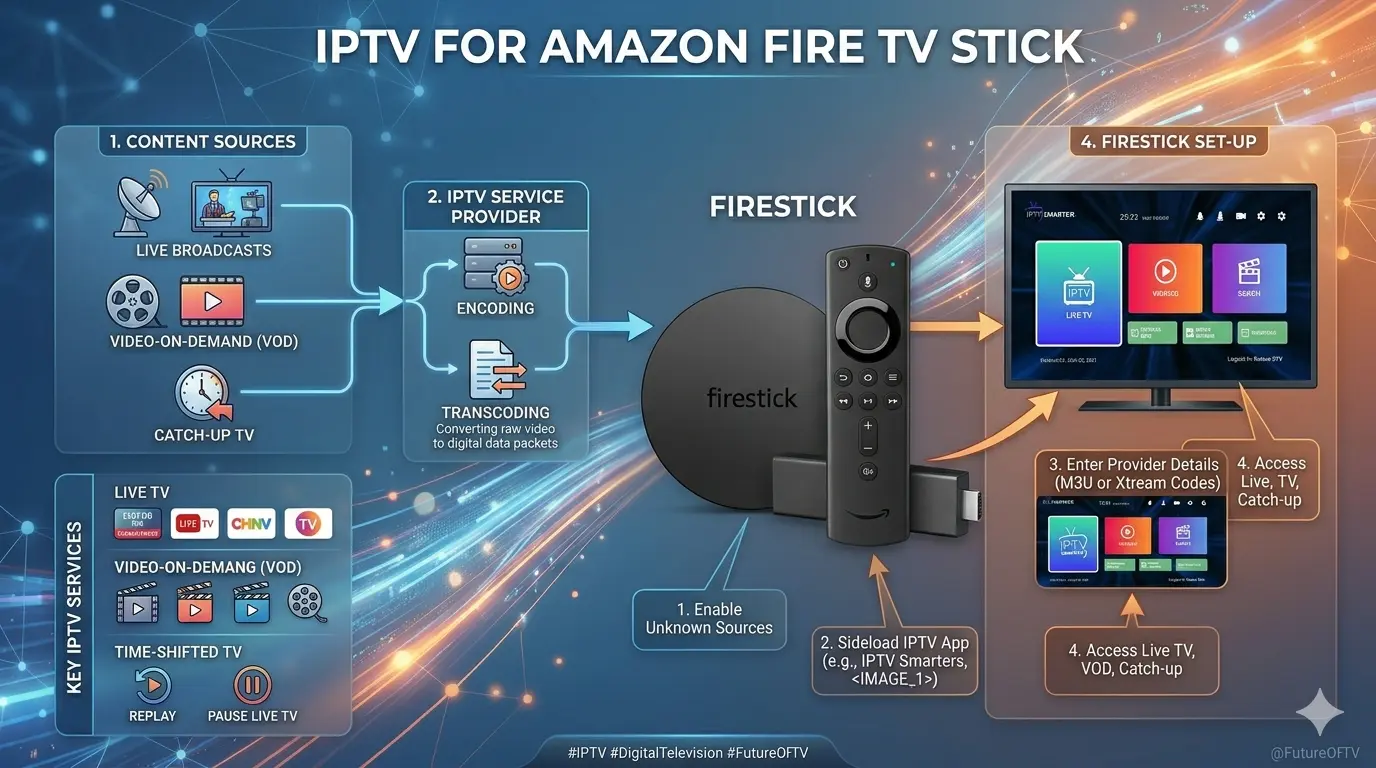
One of the most popular IPTV setups in Canada. Sideload Smarters Pro via Downloader app if not in the Amazon Appstore.
Smart TVs & Android TV
Samsung, LG, Sony, Philips (Android), Hisense, TCL. Install from the relevant app store on your Smart TV.
Windows & macOS
Desktop and laptop computers via dedicated desktop apps or web browser. Great for watching IPTV while working.
Android TV Boxes
Formuler Z8, BuzzTV XRS 4900, Nvidia Shield, Mecool KM7. Install Smarters Pro directly from the Play Store.
How to Set Up IPTV Smarters Pro (Step by Step)
- Download and install IPTV Smarters Pro on your device.
- Open the app and tap "Add User" or "Login with Xtream Codes API".
- Enter your IPTV subscription credentials: Username, Password, and Server URL (provided by your IPTV provider).
- Alternatively, choose "Add URL/Upload M3U" and paste your M3U playlist link.
- Wait for the playlist to load — this may take a minute depending on the number of channels.
- Browse Live TV, Movies (VOD), and Series from the main menu.
- Set up your EPG guide for the TV programme schedule overlay.
💡 Pro Tip: Getting the Best Quality from IPTV Smarters Pro
In Settings, switch the stream format to HLS if you experience buffering on RTSP/RTMP. For 4K streams, ensure your device and TV support H.265/HEVC decoding. Using a wired Ethernet connection instead of Wi-Fi virtually eliminates buffering on HD and 4K channels.
IPTV with a Box — The Best IPTV Boxes for Canada
While IPTV apps like Smarters Pro work great on smartphones, tablets, and Smart TVs, many users prefer the experience of a dedicated IPTV box connected to their main TV. IPTV boxes (also called IPTV set-top boxes or Android TV boxes) offer more processing power, better remote control ergonomics, and often superior app compatibility compared to Smart TV built-in systems.
Using IPTV with a box also future-proofs your setup: when you buy a new TV, you simply move your IPTV box over — no need to re-configure your Smart TV system or lose your settings.
Types of IPTV Boxes
There are three main categories of hardware you can use to enjoy IPTV on your TV:
1. Android TV Boxes
These are compact devices running a full version of Android (or Android TV), connected to your TV via HDMI. They support Google Play Store apps, including IPTV Smarters Pro, TiviMate, and dozens of other IPTV players. Popular models in Canada include:
- Formuler Z8 / Z8 Pro — Premium Android TV box with built-in IPTV launcher (MYTV Online)
- BuzzTV XRS 4900 / XPL 3000 — Canadian brand, popular for IPTV users in Canada
- Nvidia Shield TV Pro — High-end box with 4K HDR and Dolby Vision, best-in-class performance
- Mecool KM7 Plus / KM2 Plus — Certified Android TV boxes with Google Play and Netflix support
2. Amazon Fire Stick / Fire TV
Amazon's Fire Stick (especially the 4K Max version) has become one of the most popular IPTV platforms in Canada. Inexpensive, easy to use, and widely available at Canadian retailers. IPTV Smarters Pro can be sideloaded onto Fire Stick using the Downloader app if not available in the Amazon Appstore. The Fire TV Cube (3rd Gen) is the premium option, with built-in Ethernet and faster processing.
3. MAG Boxes
MAG set-top boxes (by Infomir) were among the first dedicated IPTV hardware and remain popular in the industry. They run their own proprietary Linux-based operating system (not Android) and are accessed via Stalker Middleware IPTV portals. MAG boxes are less flexible than Android boxes but are extremely stable and optimized specifically for IPTV delivery.
What to Look for When Buying an IPTV Box in Canada
- 4K HDR Support: Essential for future-proofing and enjoying 4K IPTV channels. Look for 4K UHD + HDR10 + Dolby Vision support.
- Processor Speed: A fast processor (quad-core or better, Amlogic S905X4 or above) prevents lag and buffering.
- RAM and Storage: At least 2GB RAM and 8GB storage. 4GB RAM + 32GB storage is ideal.
- Ethernet Port: Wired internet gives far more stable IPTV performance than Wi-Fi. Ensure the box has a Gigabit Ethernet port.
- Wi-Fi Standard: Dual-band Wi-Fi 5 (802.11ac) or Wi-Fi 6 (802.11ax) for wireless setups.
- Android Version: Android 11 or higher for access to latest apps and security updates.
IPTV in Canada — What You Need to Know
Canada has one of the world's highest rates of IPTV adoption, driven by expensive traditional cable and satellite services and a highly tech-savvy population. The Canadian IPTV market is diverse, spanning both ISP-managed IPTV services and a large ecosystem of third-party IPTV subscriptions from Canada and internationally.
Canadian IPTV Channels and Content
A good IPTV service from Canada should include a full selection of Canadian content, including:
- All major Canadian broadcast networks: CBC, CTV, Global, City TV, TVA (French), Radio-Canada
- Canadian specialty channels: TSN 1–5 (sports), Sportsnet, The Score, RDS (French sports), CP24 (news), BNN Bloomberg, APTN
- Canadian regional news: CBC regional, CTV local affiliates, Global regional
- Canadian French-language channels for Québec viewers
- US networks: NBC, CBS, ABC, Fox, PBS, ESPN, NFL Network, NBA TV, etc.
- UK, European, and international channels
Internet Speed Requirements for IPTV in Canada
Canada's major internet providers (Bell, Rogers, Telus, Shaw, Videotron) all offer broadband plans capable of handling IPTV, but speeds matter. Here's what you need:
Note that the above speeds are per concurrent stream. If two people in your household are watching IPTV simultaneously — both in 4K — you need at least 50–80 Mbps of stable bandwidth dedicated to IPTV. Most Canadian home internet plans in 2025 easily meet these requirements.
Choosing an IPTV Service from Canada
When choosing an IPTV service based in Canada or serving Canadian customers, look for these key quality indicators:
- Server location: Canadian or North American servers reduce latency and improve stream stability.
- Uptime guarantee: A quality service should maintain 99%+ uptime. Ask about their redundancy setup.
- Trial period: Reputable providers offer a 24–48 hour free trial so you can test quality before committing.
- Channel count and quality: More isn't always better — focus on whether the specific Canadian, US, and international channels you want are included and streaming in HD/4K.
- Customer support: Look for responsive support via ticket, email, or live chat — especially useful for setup troubleshooting.
- Device connections: How many simultaneous streams are included? Two is the minimum for a typical household.
- EPG (TV Guide): A good EPG is essential for a comfortable viewing experience — check whether it's populated for your key channels.
How to Get Started with IPTV — Full Setup Guide
Getting started with IPTV in Canada is simpler than most people expect. Here's a complete step-by-step process to go from zero to watching IPTV on your TV, phone, or tablet.
Step 1: Choose Your Device
You need at least one compatible device. The easiest options for most Canadians are:
- Your existing Android smartphone or tablet (free)
- Your existing iPhone or iPad (free)
- Your existing Smart TV (if it supports Android TV or has an IPTV app)
- An Amazon Fire Stick 4K Max (~$70 CAD at Amazon.ca)
- A dedicated Android TV box (BuzzTV, Formuler, Mecool — $50–$200 CAD)
Step 2: Choose Your IPTV Subscription
Select a reputable IPTV provider that offers Canadian channels, 4K streams, a stable server, and responsive customer support. Look for a trial period to test before paying. IPTV Canada 4K offers plans with free trials and includes thousands of live channels in HD and 4K.
Step 3: Install an IPTV Player App
Install IPTV Smarters Pro (recommended for beginners) or another IPTV player:
- IPTV Smarters Pro — Easiest interface, Xtream Codes + M3U support, available on all platforms
- TiviMate (Android only) — Premium UI, advanced EPG, highly customizable
- GSE Smart IPTV (iOS/Android) — Good for iOS users, supports multiple playlists
- VLC Media Player (all platforms) — Open-source, flexible, but minimal IPTV-specific features
- Kodi with PVR IPTV Simple Client (all platforms) — Highly customizable, best for advanced users
Step 4: Load Your IPTV Subscription
Using the credentials provided by your IPTV service (server URL, username, password, or M3U link), add your subscription to your player app. This typically takes under 2 minutes. Wait for the channel list and EPG to load.
Step 5: Optimize Your Setup
- Use wired Ethernet wherever possible for the most stable streams
- Set your player app to HLS playback mode if available, for adaptive bitrate
- Enable hardware decoding in your app settings for smoother 4K playback
- Set up your EPG guide URL for the TV programme schedule
- Create a favourites list with your most-watched channels for quick access
IPTV Troubleshooting — Common Issues and Fixes
Even the best IPTV setup can occasionally run into issues. Here are the most common IPTV problems Canadian viewers encounter and how to fix them.
Buffering and Freezing
The most common IPTV complaint. Causes and solutions:
- Slow internet: Run a speed test. If speeds are below 25 Mbps for 4K, upgrade your plan or switch to wired Ethernet.
- Wi-Fi interference: Move your device closer to the router or switch from 2.4GHz to 5GHz Wi-Fi.
- Server overload: During peak hours (evenings), some IPTV servers get congested. Try a different stream quality or contact your provider.
- VPN overhead: If using a VPN, it can reduce your effective bandwidth. Try disabling it temporarily.
- Player app cache: Clear the app cache in your device settings, or try a different player app.
No EPG / TV Guide Not Loading
Check that your EPG URL is correctly entered in the app settings. Not all IPTV providers include EPG data — ask your provider for an EPG URL if missing. If the EPG URL is correct, try forcing a refresh within the app.
Channels Not Working or Missing
Reload your playlist. Channel URLs can change — contact your IPTV provider if multiple channels are down. A quality provider will quickly push updated M3U playlists. Using Xtream Codes API login (instead of a static M3U URL) typically solves this issue, as the playlist updates automatically.
Picture Quality Too Low
Check whether your subscription includes HD and 4K streams — many basic IPTV plans are SD only. Within your player app, check if an HD or 4K version of the channel is available under different stream options. Ensure your TV and player app are set to output at the correct resolution.
The Future of IPTV — Where Is the Technology Going?
IPTV is not a static technology — it is evolving rapidly. Several trends are shaping the future of IPTV for Canadian consumers and globally.
8K IPTV and Beyond
While 4K IPTV is now mainstream, 8K content is beginning to appear. As TV manufacturers like Samsung and LG push 8K displays into Canadian homes, IPTV providers will follow with 8K streams. The H.266 (VVC) codec — even more efficient than H.265 — will make 8K streaming practical without requiring astronomically high internet speeds.
AI-Powered IPTV Recommendations
Artificial intelligence is already being integrated into IPTV platforms to power personalized content recommendations, automatic quality optimization based on network conditions, and smart catch-up TV features that surface shows you might have missed. Expect AI to become a standard feature of premium IPTV players and services.
Cloud-Based DVR and Storage
Cloud DVR — the ability to record IPTV content remotely to cloud storage and watch it back on any device — is becoming a standard IPTV feature. This replaces physical DVR hardware and allows nearly unlimited recording capacity.
5G and IPTV
The rollout of 5G mobile networks across Canada opens up IPTV streaming on-the-go at home-broadband quality speeds. 5G home internet (already available in some Canadian cities) offers an excellent low-latency connection for IPTV, particularly in areas underserved by fiber or cable.
IPTV and Smart Home Integration
IPTV is increasingly being integrated with smart home ecosystems. Voice control via Google Assistant, Amazon Alexa, and Apple Siri allows users to change channels, search for content, and control playback hands-free. Integration with smart home displays means content can follow you from screen to screen.
Frequently Asked Questions About IPTV
Ready to Try IPTV in Canada?
IPTV Canada 4K offers premium IPTV subscriptions with 20,000+ channels, 4K quality, Canadian channels, and a free trial. No contract required.
View Plans & Start Free Trial →Conclusion
IPTV has fundamentally changed how Canadians watch television. By delivering TV content over the internet rather than through dedicated broadcast infrastructure, IPTV offers an unparalleled combination of value, flexibility, content breadth, and picture quality that traditional cable and satellite simply cannot match.
Whether you're looking to cut the cord and save hundreds of dollars a year, access international channels that aren't available on Canadian cable, enjoy 4K sports and movies, or simply want the freedom to watch your favourite shows on any screen at any time — IPTV delivers all of this and more.
The tools are accessible to everyone: from the free IPTV Smarters Pro app on your existing smartphone to a dedicated IPTV box on your main TV, getting started with IPTV in Canada has never been easier. With the right IPTV subscription from Canada, you can be streaming live TV, movies, and series in HD or 4K within minutes.
If you found this guide helpful, explore our other IPTV blog articles, including our detailed guide on whether IPTV is legal in Canada. And if you're ready to take the plunge, check out our IPTV Canada 4K plans — with a free trial, there's no risk to getting started.