How to Connect IPTV Box to TV
How to Connect IPTV Box to TV — 6 Steps
Follow these steps to connect any IPTV box to your TV and get streaming in under 10 minutes. Works for all IPTV boxes — Formuler, Firestick, Android box, NVIDIA Shield, or MAG.
Get Your IPTV Box
Purchase an IPTV box from Amazon.ca, Best Buy Canada, or formuler.ca. Best options: Formuler Z10 Pro Max (~$189, dedicated IPTV), Firestick 4K Max (~$79, budget), NVIDIA Shield (~$249, power users), or a generic Android box (~$59–99). All ship to Toronto GTA, Ontario, and all Canada.
Subscribe to IPTV Canada 4K
Contact IPTV Canada 4K via WhatsApp and choose your plan (from $15.99/month or $79.99 for 15 months). Receive your Xtream Codes API credentials (server URL, username, password) within minutes of payment. No waiting for hardware — subscribe first, credentials arrive immediately.
Connect IPTV Box to Internet
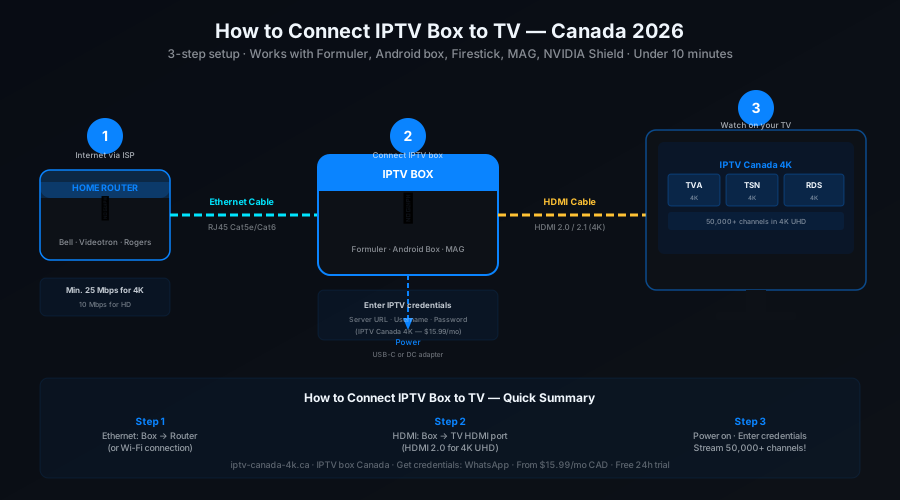
Plug an Ethernet cable (Cat5e or Cat6) from the Ethernet port on your IPTV box into one of the LAN ports on your home router. Ethernet is strongly recommended for 4K stability — it delivers lower latency and more consistent bandwidth than Wi-Fi. If your box is a Firestick or only has Wi-Fi, connect to your 5 GHz Wi-Fi network for the best 4K IPTV performance.
Connect IPTV Box to TV via HDMI
Plug an HDMI cable from your IPTV box's HDMI output port into an open HDMI port on your TV. For 4K UHD output, use an HDMI 2.0 or 2.1 cable — standard HDMI 1.4 limits 4K to 30 Hz. Power on your IPTV box. On your TV remote, press Source / Input and select the HDMI port you used (HDMI 1, HDMI 2, etc.).
Install Your IPTV App
Open the IPTV app on your device. Each box works differently:
Formuler: Open MyTVOnline2 (pre-installed) → Add New Provider
Firestick: Search Fire TV store for "IPTV Smarters Pro" → Install (free)
Android box: Download TiviMate APK via Downloader app → sideload install
MAG box: Settings → Servers → Portal 1 URL (enter your M3U portal URL)
Enter IPTV Canada 4K Credentials
In your IPTV app, select Xtream Codes API (or "Add playlist" → "Xtream Codes"). Enter:
• Server URL: provided by IPTV Canada 4K via WhatsApp
• Username: your account username
• Password: your account password
Channels load automatically — 50,000+ live channels with EPG guide appear in under 60 seconds. Select any channel and start streaming in 4K.